
How to Build a Shopify B2B Wholesale Registration Form with Customer Auto-Tagging (Without Shopify Plus)
Shopify Plus charges $2,000/month for native B2B company profiles. Discover how Formpify allows growing merchants to build automated B2B wholesale registration forms with instant customer account creation, automatic tagging, tax-exempt metafield mapping, and gated catalog access.
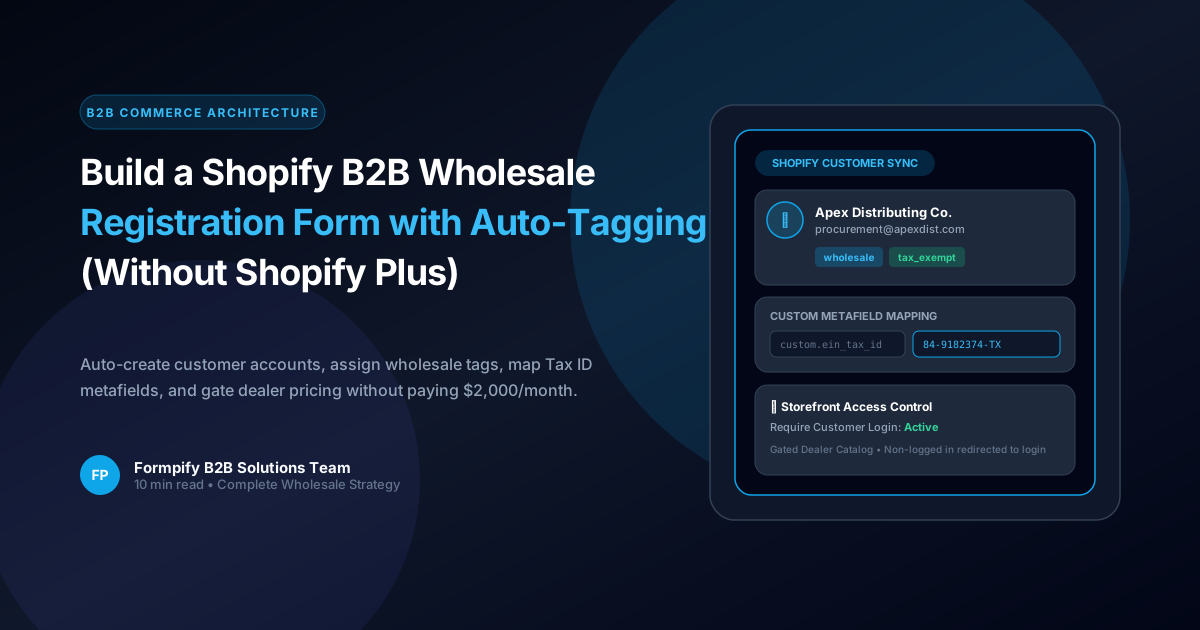
- Shopify Plus locks native B2B wholesale features behind a $2,000/month paywall, forcing growing direct-to-consumer and hybrid brands to seek scalable alternatives.
- Formpify's built-in Customer Account Registration connects directly to the Shopify Admin Customer API, automatically turning wholesale applicant submissions into verified customer accounts.
- Automatic Customer Tagging (e.g. 'wholesale', 'tier_1_dealer', 'tax_exempt') seamlessly triggers tier pricing rules in discount apps, Shopify automatic discounts, and wholesale catalog apps.
- Custom Metafield Mapping syncs crucial trade data—like EIN Tax ID, Resale Certificate upload URLs, and business licenses—straight to the customer profile without manual data entry.
- Storefront Access Control allows merchants to gate exclusive wholesale ordering pages, custom RFQ forms, and dealer portals behind customer login.
- Configurable approval workflows let you choose between immediate automatic approval with activation emails or manual admin review before granting wholesale tag privileges.
Table of Contents
- →1. The B2B Wholesale Dilemma: Why Shopify Plus ($2,000/mo) Locks Out Growing Brands
- →2. Architecture of an Automated Wholesale Funnel (Form → Account → Tags → Metafields)
- →3. Step-by-Step: Setting Up B2B Customer Registration in Formpify
- →4. Customer Auto-Tagging: Connecting Form Submissions to Wholesale Pricing
- →5. Trade Compliance: Mapping Tax ID, EIN & Resale Certificates to Metafields
- →6. Gating Wholesale Portals with Storefront Access Control
- →7. Instant Auto-Approval vs. Manual Compliance Review
1. The B2B Wholesale Dilemma: Why Shopify Plus ($2,000/mo) Locks Out Growing Brands
For growing direct-to-consumer (DTC) brands expanding into wholesale, boutique distribution, corporate gifting, or dealer networks, selling B2B on Shopify has historically presented a painful ultimatum:
- Option A: Upgrade to Shopify Plus ($2,000+/month) — Access native B2B company profiles, catalog price lists, and payment terms, but shoulder an enormous fixed monthly overhead before wholesale sales have reached scale.
- Option B: The Clunky Email & Spreadsheet Trap — Publish a generic contact form, receive fragmented PDF applications in customer service inboxes, manually copy-paste tax IDs and billing addresses into Shopify Admin, manually create customer accounts, and draft manual invoices.
The manual route is a growth killer. Commercial buyers expect consumer-grade digital onboarding. When an authorized retailer wants to place an initial $5,000 order, every 24-hour delay in account provisioning cuts buyer conversion by over 30%.
💡 The Modern Alternative: Tag-Based Wholesale Automation
You do not need a Shopify Plus enterprise contract to run a world-class wholesale operation. By combining Formpify's native Customer Account Registration engine with Shopify's built-in Customer Tagging and Metafield architecture, standard Shopify plans ($39/mo to $399/mo) can automate 100% of dealer onboarding, compliance verification, and tiered price gating.
2. Architecture of an Automated Wholesale Funnel (Form → Account → Tags → Metafields)
Traditional form builders merely collect form responses and dump them into a siloed third-party dashboard or email notification. Formpify operates directly at the Shopify Admin API level to execute four mission-critical actions upon a single submission:
Account Creation
Instantly provisions a new Shopify Customer record with company name, email, phone, and default business address.
Auto-Tagging
Appends tags like wholesale, b2b_tier_1, or net_30 to automatically trigger discounted catalog pricing.
Metafield Mapping
Saves EIN, State Tax Exemption IDs, and uploaded resale certificate URLs directly into custom customer metafields.
Activation Dispatch
Triggers Shopify's official Customer Account Activation email so the wholesale partner can set their password immediately.
{
  "customer": {
    "first_name": "Marcus",
    "last_name": "Vance",
    "email": "m.vance@pacificdistributors.com",
    "phone": "+15125550198",
    "tags": "wholesale, b2b_tier_1, tax_exempt, net_30",
    "addresses": [
      {
        "company": "Pacific Distribution Group LLC",
        "address1": "4800 Industrial Blvd, Suite 200",
        "city": "Austin",
        "province": "TX",
        "zip": "78744",
        "country": "United States"
      }
    ],
    "metafields": [
      {
        "namespace": "custom",
        "key": "ein_tax_id",
        "value": "74-3891024",
        "type": "single_line_text_field"
      },
      {
        "namespace": "custom",
        "key": "resale_certificate_pdf",
        "value": "https://uploads.formpify.com/resale-certs/pacific-tx-2026.pdf",
        "type": "url"
      }
    ],
    "send_email_invite": true
  }
}
3. Step-by-Step: Setting Up B2B Customer Registration in Formpify
Configuring an automated wholesale customer registration flow in Formpify requires zero coding. Follow these steps inside the visual builder:
- Build Your Wholesale Intake Form: Add the standard fields required for trade verification:
- Company & Contact: Business Legal Name, DBA, Contact First & Last Name, Corporate Email Address, Work Phone.
- Physical Shipping Address: Street Address, Suite/Unit, City, State/Province, Postal Code, Country.
- Trade Verification: Federal Tax ID / EIN, Resale Exemption Certificate (File Upload field accepting PDF/PNG), and Years in Business.
- Wholesale Profile: Primary sales channel (Brick & Mortar, E-Commerce, Interior Design), estimated quarterly spend, and requested credit terms.
- Open Form Settings: In the Formpify Builder, click the Settings icon on the left vertical toolbar.
- Navigate to General Setup: Scroll down to the Customer Account Registration card.
- Enable User Registration: Toggle the switch to Enabled.
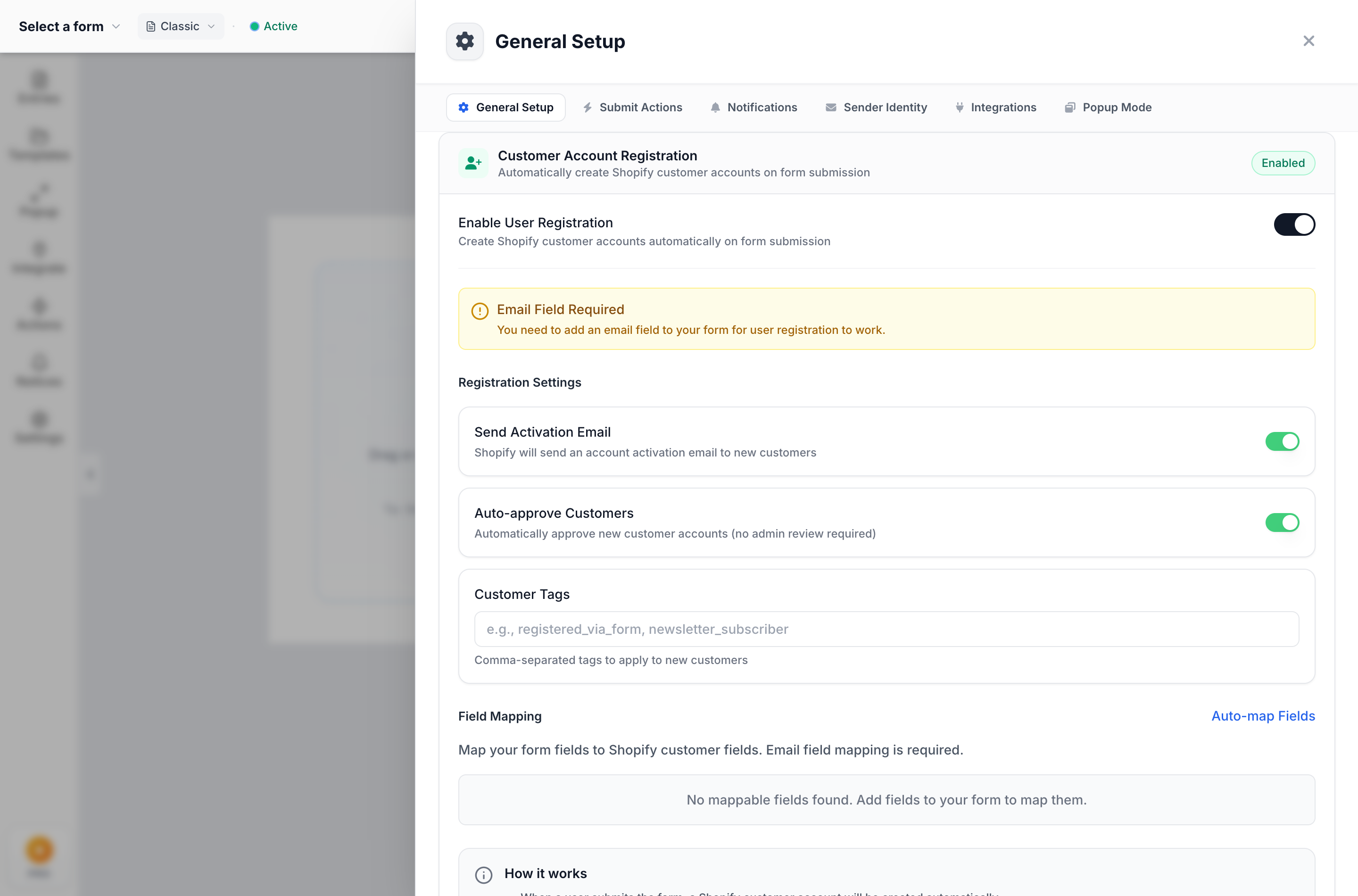
Formpify Builder: Configuring Customer Account Registration with Send Activation Email, Auto-Approve, and Wholesale Customer Tags
- Configure Account Preferences:
- Send Activation Email: Toggle ON so Shopify sends an automated email invitation containing a secure link to create a password.
- Auto-approve Customers: Toggle ON if you want the account active immediately, or OFF if you want applications held in a pending state until manual compliance review.
- Customer Tags: Enter comma-separated tags to automatically attach to approved applicants (e.g.
wholesale, b2b_pending, verified_reseller).
- Map Form Fields to Shopify Customer Attributes: Click Auto-map Fields or manually match form inputs to Shopify customer profile fields (Email, First Name, Last Name, Phone, Company, Address, and Custom Metafields).
4. Customer Auto-Tagging: Connecting Form Submissions to Wholesale Pricing
Customer tags are the backbone of Shopify's non-Plus wholesale ecosystem. Once Formpify stamps a registered customer with the wholesale tag, this tag acts as a universal trigger across your entire eCommerce tech stack:
How Customer Tags Unlock Wholesale Features:
wholesale (e.g. 40% off sitewide on orders over $500).
net_30_approved tag.
5. Trade Compliance: Mapping Tax ID, EIN & Resale Certificates to Metafields
One of the greatest headaches for wholesale operations is compliance documentation. Under state tax laws, merchants selling wholesale tax-free must retain verified resale certificates and Federal Employer Identification Numbers (EINs) on file.
Without Formpify, merchants often write these sensitive numbers into arbitrary order notes or customer notes, making structured search, auditing, and ERP export virtually impossible. With Formpify's Custom Metafield Mapping:
- Single-Line Text Metafields: Map your form's "Federal Tax ID (EIN)" field directly to
customer.metafields.custom.tax_id. - URL & File Reference Metafields: Map your form's "Upload Resale Certificate" File Upload field directly to
customer.metafields.custom.resale_certificate_url. The uploaded document is stored securely on CDN and directly accessible from the customer's admin profile. - State Sales Tax License: Retain state-specific registration numbers for automated exemption audits.
When state tax authorities audit your tax-exempt transactions, all compliance documentation is organized directly inside the native Shopify Customer record—no digging through email archives or third-party databases.
6. Gating Wholesale Portals with Storefront Access Control
Publicly exposing wholesale discount order forms or proprietary dealer pricing to retail shoppers can cannibalize your consumer pricing and frustrate authorized dealers. To protect proprietary trade pricing, Formpify includes built-in Storefront Access Control.
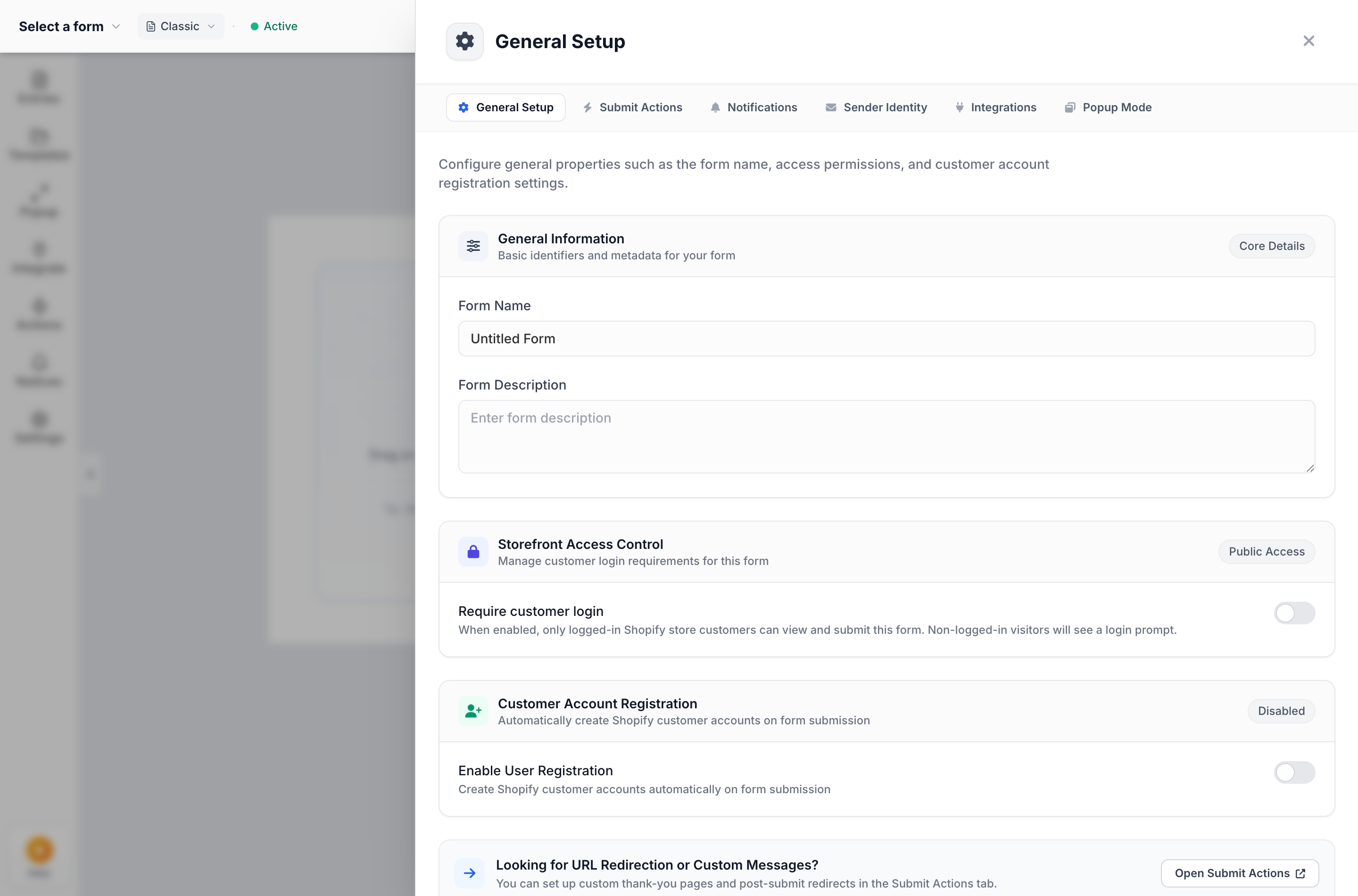
Formpify Builder: Enabling Storefront Access Control to restrict form viewing and submissions to authenticated Shopify customers
Inside Settings > General Setup > Storefront Access Control, you can activate:
- Require Customer Login: When enabled, only logged-in Shopify customers can view and submit the form. Unauthenticated visitors are presented with a clean login gate.
- Customizable Login Prompt: Set a branded message (e.g. "Wholesale Portal Access — Please log in with your authorized dealer account to place orders or view tier pricing.").
- Instant Redirect to Registration: Provide a direct link for unapproved buyers: "Don't have an authorized dealer account? Apply for wholesale status here."
This allows you to embed quick-order wholesale forms, bulk SKU matrix re-order pads, or custom quote request forms directly on your store while keeping retail visitors completely locked out.
7. Instant Auto-Approval vs. Manual Compliance Review
Depending on your product line and margin structure, you have full control over the onboarding approval gate:
Workflow A: Instant Frictionless Auto-Approval
Toggle Auto-approve Customers ON and add the tag wholesale. The moment the merchant submits the form:
- Shopify customer record is created with
wholesaletag. - Shopify dispatches an account activation invite.
- Customer sets password and instantly purchases at wholesale rates.
- Best for: Low-risk wholesale catalogs, sample orders, digital products, and brand merchandise.
Workflow B: Two-Stage Compliance Vetting
Toggle Auto-approve Customers OFF and apply the initial tag b2b_pending:
- Customer record is created, but no discounted tags are granted yet.
- Your compliance team reviews the submitted Tax ID and Resale Certificate.
- With one click in Shopify Admin, change tag to
wholesale_approvedand click Send Account Invite. - Best for: High-ticket luxury goods, territory-restricted dealerships, and strict tax-exempt resale channels.
With Formpify, your wholesale registration funnel scales smoothly alongside your business—turning custom forms into an automated, high-converting B2B customer acquisition engine without paying enterprise SaaS premiums.
Automate your Shopify B2B wholesale onboarding
Create customer accounts, auto-tag wholesale tiers, and map business tax metafields in one click.
Ready to supercharge your Shopify forms?
Join thousands of merchants creating custom forms, surveys, and live cost calculators.