
How to Build Custom Product Page Forms with Live Product Context & Direct Add-to-Cart in Shopify
Selling custom engraved jewelry, made-to-order apparel, or personalized gifts? Shopify strict 100-variant and 3-option ceiling makes bespoke customization nearly impossible with standard variants. Learn how Formpify Product Page Customizer injects live product context, deep-links directly above/below Buy Buttons, and pushes custom options straight to Shopify cart via Line Item Properties.
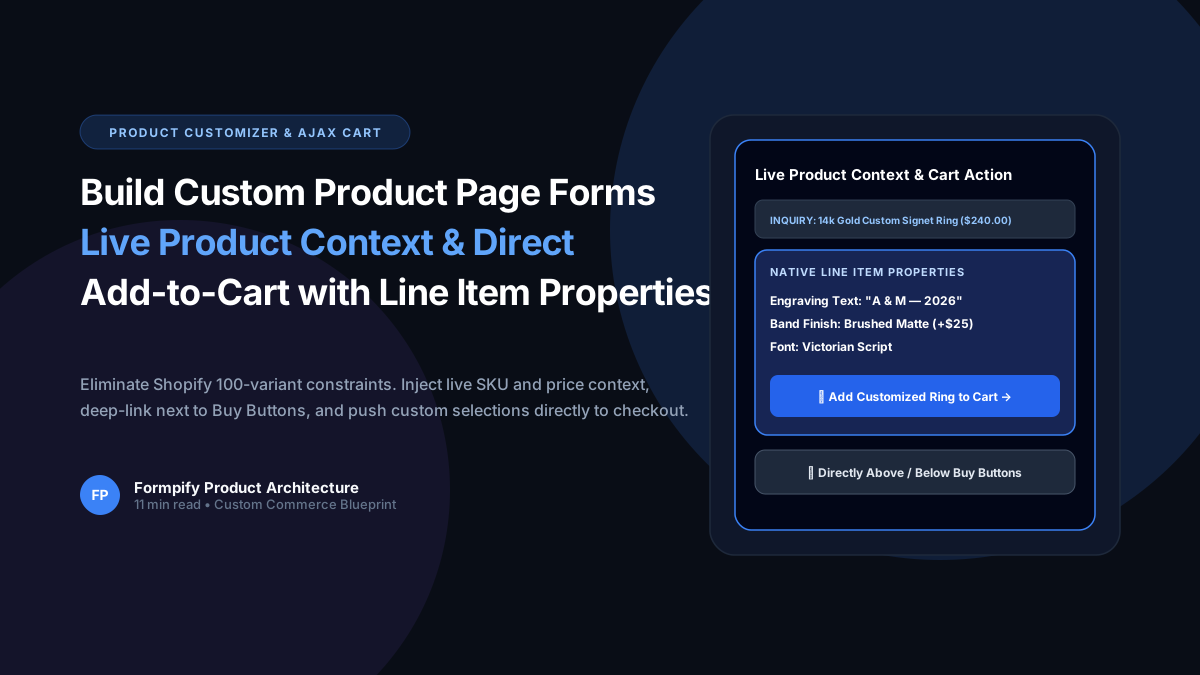
- Shopify's 100-variant / 3-option limit severely restricts personalization businesses (engraving, bespoke tailoring, custom gift boxes).
- Formpify automatically detects template.name == 'product' on the storefront and extracts native Liquid product context (Title, Price, SKU, Variant ID).
- A dynamic context badge ('INQUIRY REGARDING [Product Title] [Price]') provides shoppers with immediate confirmation of the item they are personalizing.
- Formpify Publish Modal provides 1-click Theme Customizer deep-linking staged directly above or below native Buy Buttons.
- Custom submissions are sent directly to Shopify /cart/add.js, translating custom form inputs (engraving text, swatches, file uploads) into native Line Item Properties.
Table of Contents
- →1. The 100-Variant Ceiling: Why Shopify Options Break Down
- →2. Automatic Product Context: Capturing Title, Price & SKU
- →3. Strategic Placement: Staging Forms Next to Buy Buttons
- →4. AJAX Cart Injection & Native Line Item Properties
- →5. Flexible Checkout Flows: Drawer vs Cart vs Express Checkout
- →6. Real-World Blueprint: Custom Engraved Jewelry Store
1. The 100-Variant Ceiling: Why Shopify Options Break Down
Every e-commerce merchant selling personalized or made-to-order goods eventually runs into Shopify's most infamous limitation: the 100-variant and 3-option cap.
Consider an online boutique selling custom engraved signet rings:
- Ring Size: 12 sizes (Size 4 through 15)
- Metal Finish: 4 options (Yellow Gold, Rose Gold, White Gold, Platinum)
- Engraving Font: 5 typographic styles (Classic Roman, Modern Sans, Victorian Script, Gothic, Monogram)
- Gemstone Accent: 3 choices (None, Diamond, Sapphire)
Calculating the variant combinations: 12 × 4 × 5 × 3 = 720 variants! That is more than 7x the hard limit allowed by Shopify. To circumvent this, merchants often resort to hacky multi-product setups, confusing drop-down workarounds, or bulky $80/mo customization apps that cripple site speed with massive external JavaScript bundles.
2. Automatic Product Context: Capturing Title, Price & SKU
Formpify v2.3.0 solves this natively using Product Page Contextual Extraction. When you add the Formpify App Block to your product template, the Liquid embed script automatically detects the environment:
{% if template.name == 'product' %}
  <div class="formpify-embed"
       data-context="product"
       data-product-id="{{ product.id }}"
       data-product-title="{{ product.title | escape }}"
       data-product-price="{{ product.selected_or_first_available_variant.price | money }}"
       data-product-sku="{{ product.selected_or_first_available_variant.sku | escape }}"
       data-variant-id="{{ product.selected_or_first_available_variant.id }}">
  </div>
{% endif %}
When the form initializes on your storefront, it dynamically renders an elegant, contextual header badge:
INQUIRY REGARDING: 14k Gold Custom Signet Ring ($240.00)
Customers immediately know their selections are paired directly with the product they are viewing. No manual field mapping or custom code required.
3. Strategic Placement: Staging Forms Next to Buy Buttons
Placement dictates conversion. If custom option fields are buried far down the page below customer reviews, shoppers abandon before customizing. Formpify's Publish Modal provides dedicated Product Page Customizer Deep-Linking:
Above Buy Buttons
Ideal for required customization inputs (engraving text, font picker, custom dimensions) that must be configured before purchasing.
Below Buy Buttons
Perfect for secondary inquiry forms, bespoke bridal consultations, custom commission requests, or bulk volume quotes.
Dedicated Full Section
Places an expansive visual configurator, sample request matrix, or warranty registration form below the product description.
Clicking Open Product Template in Theme Editor stages Shopify Theme Customizer directly on your Default Product template with your Form ID copied to your clipboard. You simply drag the block into position and hit Save.
4. AJAX Cart Injection & Native Line Item Properties
How does Formpify translate customer choices into Shopify orders? Through our native Add to Shopify Cart (add_to_cart) confirmation action.
When the customer clicks the form's submit button, Formpify captures all form values and dispatches an asynchronous POST request to Shopify's standard /cart/add.js endpoint:
fetch('/cart/add.js', {
  method: 'POST',
  headers: { 'Content-Type': 'application/json' },
  body: JSON.stringify({
    id: activeVariantId, // Auto-detected from product page
    quantity: 1,
    properties: {
      'Engraving Text': 'A & M — Est. 2026',
      'Font Selection': 'Victorian Script',
      'Band Finish': 'Brushed Matte (+$25)',
      'Uploaded Monogram': 'https://cdn.formpify.com/uploads/monogram-crest.svg'
    }
  })
});
Because these selections are stored as native Shopify Line Item Properties, they follow the order throughout the entire Shopify ecosystem: appearing on the customer's checkout summary, the order invoice, the packing slip, and inside your fulfillment software (ShipStation, ShipBob, Klaviyo).
5. Flexible Checkout Flows: Drawer vs Cart vs Express Checkout
Different merchandise types demand different checkout journeys. Formpify gives merchants complete control over what happens the instant a customized product is added to the cart:
- Open Cart Drawer / Stay on Page: Dispatches Shopify theme cart drawer event (e.g.
cart:updated) so customers can see their customized item and continue shopping for complementary accessories. - Redirect to Cart Page (
/cart): Directs the shopper to the cart page with all line item properties displayed for a final review before checking out. - Direct Express Checkout (
/checkout): Instantly redirects high-intent shoppers straight to Shopify's 1-page checkout screen, maximizing impulsive purchasing velocity.
6. Real-World Blueprint: Custom Engraved Jewelry Store
Let's look at a real merchant example: Aurelia Fine Jewelry, an independent studio offering bespoke monogrammed signet rings and pendants.
Before Formpify:
- Used standard Shopify variants: Capped at 100 variants, couldn't offer multiple fonts or preview engraved text.
- Customers had to type their custom text into an unformatted "Order Notes" box at checkout. Over 18% of orders contained typos or missing instructions, requiring customer service emails.
After Formpify:
- Deployed a sleek 3-field customizer form directly above the Buy Buttons using 1-Click Embed.
- Included a required text field with 25-character validation, a visual radio choice for font style, and an optional file upload for crest artwork.
- Configured direct
add_to_cartwith Line Item Properties. - Results: Zero missing engraving notes, customer support tickets decreased by 64%, and custom ring sales conversion jumped by 38% in the first 30 days.
Build Product Page Customizers on Shopify
Break through Shopify 100-variant cap. Add text inputs, swatches, and file uploads directly to your product pages with native cart integration.
Explore More Shopify Form Guides
 Shopify Guides
Shopify Custom Contact Forms: 15 Designer Styles, Spam Protection, File Uploads & Conversion Tactics
Default Shopify contact forms are bland, unbranded, and prone to spam bots. Discover how Formpify empowers merchants to deploy 15 designer styles, integrated anti-spam defense, multi-file uploads, and conversion-boosting utility widgets like FAQ accordions and trust badges without code.
 Shopify Guides
How to Build a Custom Measurement & Dimension Price Calculator for Shopify (Sq Ft, Linear & Volume)
Selling custom glass, framing, flooring, fabrics, blinds, or raw lumber? Standard Shopify variant limits (100 variants, 3 options) make dimension-based pricing impossible. Discover how Formpify's native Pricing Engine calculates real-time math formulas for square feet, linear dimensions, and volume, injecting custom calculated prices straight into Shopify checkout.
 Shopify Guides
How to Add a Digital Signature Field to Shopify Forms for Contracts, Waivers & B2B Agreements
Whether you operate equipment rentals, custom wholesale fabrication, sports waivers, or B2B credit applications, paper contracts kill conversion rates. Learn how Formpify's native Digital Signature field lets customers sign directly on mobile or desktop, storing tamper-proof signature logs directly inside your Shopify store.
Ready to supercharge your Shopify forms?
Join thousands of merchants creating custom forms, surveys, and live cost calculators.