
How to Use the HTML Field
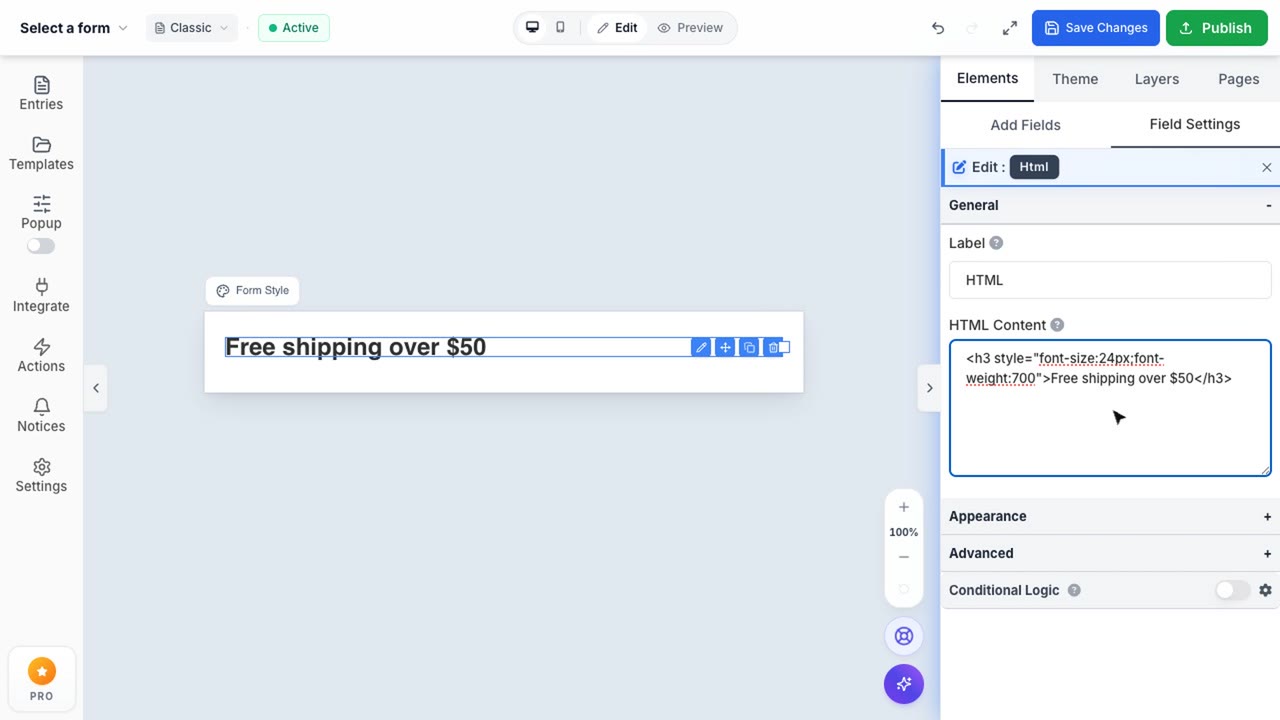
HTML Field Editor
Embed completely custom markup directly into your form for unlimited flexibility.
The HTML field is an advanced tool that allows you to embed completely custom markup directly into your form. From simple stylized text blocks to complex interactive widgets, if you have the code, you can display it.
Custom Styling & Code Execution
You have full control over the injected markup. The field natively supports standard HTML tags, inline CSS styling, and SVG elements.
- Rich Formatting: Add stylized headings, banners, or warning messages using standard inline
style="..."properties. - Media Embedding: Paste
<iframe>tags from YouTube, Vimeo, or Google Maps to integrate rich media alongside your questions. - Third-Party Widgets: Embed custom scheduling widgets (like Calendly) or booking engines right in the middle of your form flow.
Tracking Pixels & Hidden Injections
For marketers, the HTML field can be used to silently drop 1x1 tracking pixels or custom <script> tags to trigger custom conversion events upon reaching specific steps in your multi-page forms.
Note: To ensure security and prevent layout breaks, ensure your custom markup is properly closed and sanitized before deploying to production.