
How to Use the Radio Buttons Field
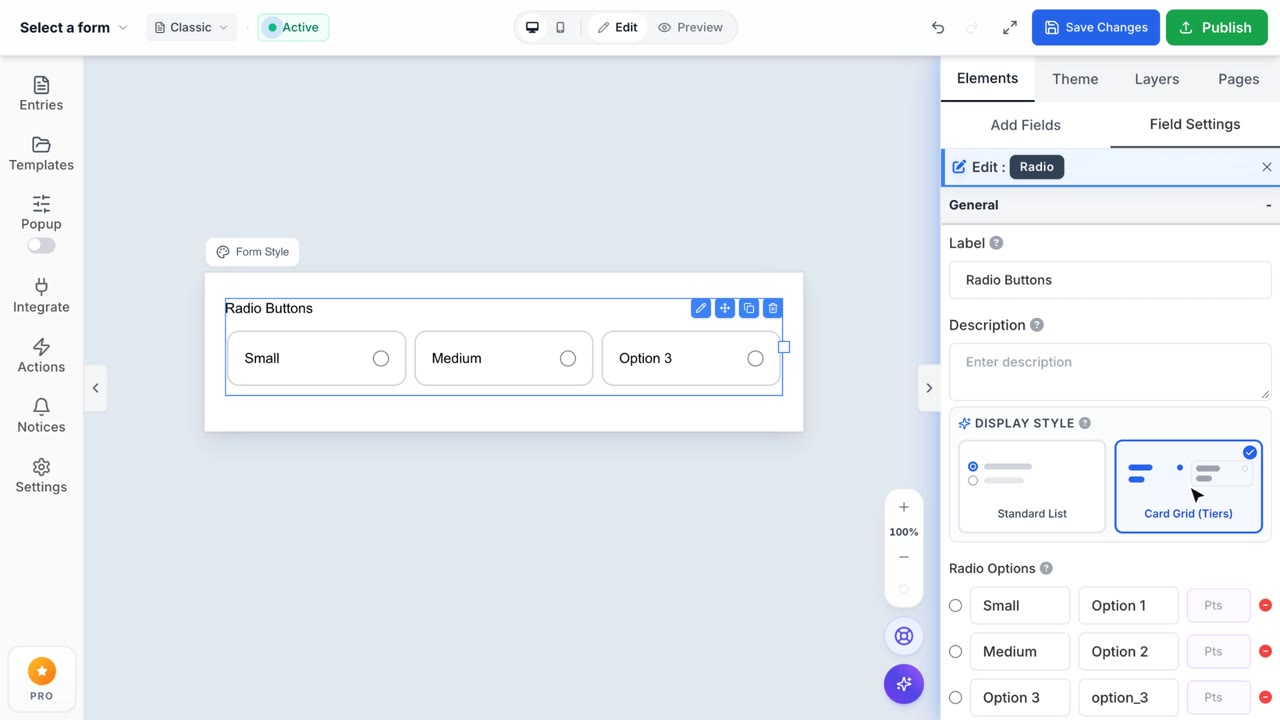
Radio Buttons Feature
Easily collect exclusive choices from your users using responsive radio button lists.
1. Exclusive Choice Selection
The Radio Buttons field enables respondents to select exactly one option from a predefined list. Simply drag and drop the field into your Form Canvas. You can effortlessly add, edit, or remove individual radio options directly from the Properties Sidebar to perfectly match your data capture requirements.
2. Multi-column Layout Optimization
Don't let long option lists break your form's aesthetic flow. Formpify's built-in Radio Row Columns matrix instantly reorganizes your list into structured columns. This preserves vertical screen space, reducing scroll fatigue and delivering a more compact, visually balanced layout for your users.
3. Strict Completion Requirements
Enforce data integrity with a single click. By toggling the Required switch, the Formpify engine mandates that users select a radio option before successfully submitting the payload, eliminating incomplete entries and streamlining your downstream processing pipelines.
4. Conditional Logic Engine (Pro)
Unlock dynamic form behavior using Advanced Logic dependencies. You can configure the form to render subsequent fields, hide irrelevant questions, or trigger specific third-party integrations only if a user selects a specific Radio option. This transforms static forms into highly personalized, adaptive workflows.