
How to Use the Rating Scale Field
Rating Scale Feature
Collect quantifiable feedback with customizable numeric, Likert, or semantic differential rating scales.
The Rating Scale field provides your users with an intuitive, interactive way to rate items, services, or experiences. This field is highly customizable, allowing you to choose between standard numeric scales, Likert scales, or semantic differentials to capture precise, quantifiable feedback.
Setting up the Scale
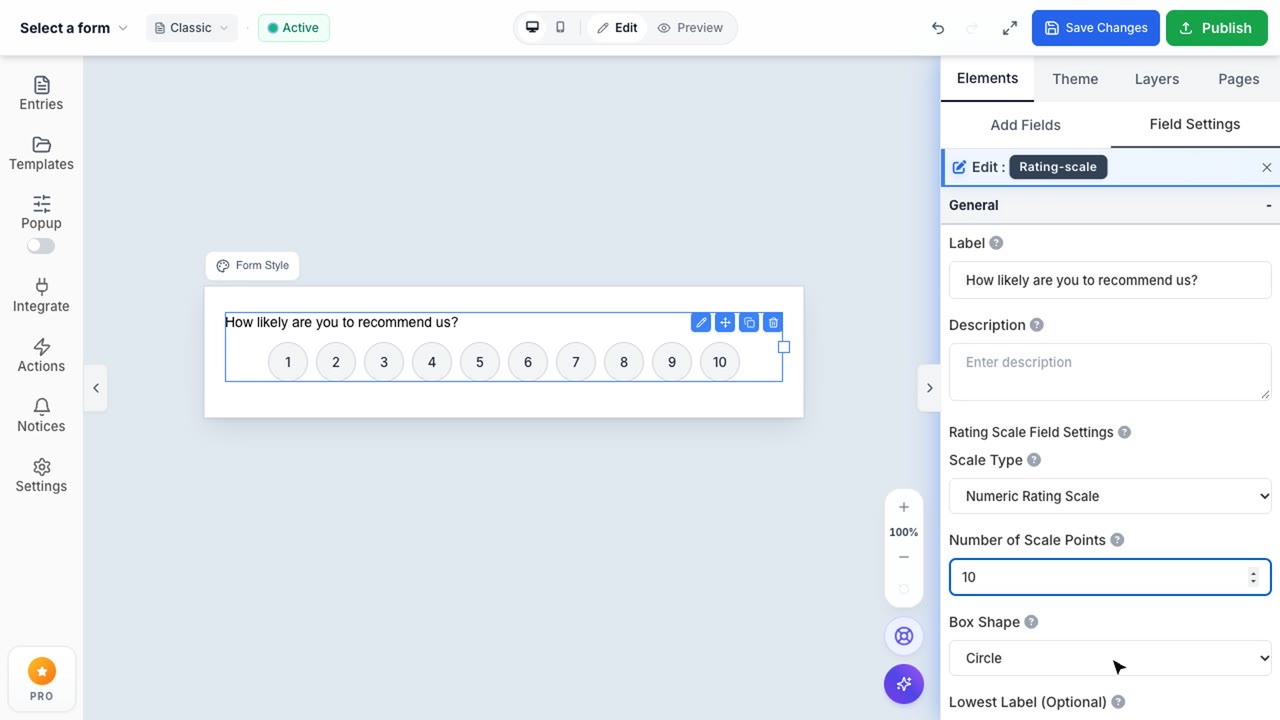
When you drag the Rating Scale field into your form, it defaults to a standard 10-point numeric scale. By clicking the field, you can access the configuration panel on the right sidebar to adjust its appearance and behavior.
You can modify several key attributes:
- Scale Type: Choose between Numeric (standard numbers), Likert (text labels like Strongly Disagree to Strongly Agree), or Semantic Differential.
- Number of Scale Points: Define the range of your scale (e.g., 1-5, 1-10).
- Box Shape: Switch between square boxes or rounded circular indicators to better match your form's design language.
- Color Styling: Customize both the selected and unselected colors of the scale indicators to align with your brand identity.
Utilizing Likert Scales
For more qualitative feedback, switching the Scale Type to Likert is ideal.
This mode transforms the standard numeric inputs into descriptive labels, allowing you to define custom text for the lowest and highest points of the scale (such as "Poor" and "Excellent"). You can also toggle the visibility of the middle label to provide users with a neutral option, enhancing the accuracy of your collected data.