
How to Use the Repeater Field
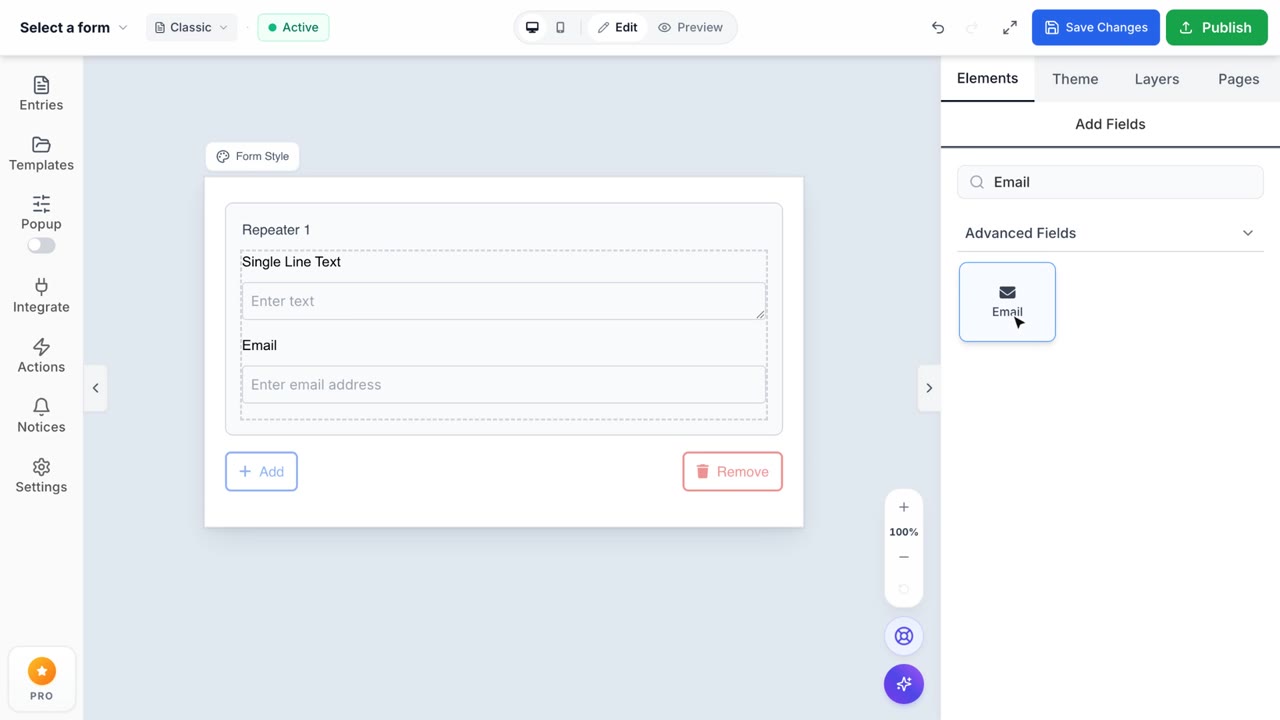
Repeater Field Feature
Allow your customers to dynamically add multiple instances of a field group.
1. Dynamic Group Duplication
The Repeater field allows your customers to dynamically add multiple instances of a field group on the fly. Simply drag the Repeater field into your canvas, which creates a smart nested container. You can then drop standard fields—like Single Line Text or Email—directly into this container to form a repeatable set.
2. Precision Instance Control
Formpify ensures you maintain strict control over data intake. From the Properties Sidebar, you can set the Minimum and Maximum allowed instances, preventing users from submitting too few or overwhelmingly too many grouped entries (e.g., limiting a workshop registration to a maximum of 5 attendees per submission).
3. Custom Branding & Labels
Deliver a personalized experience by customizing the structural text. You can define dynamic labels like "Person {number}" which automatically increments as the user adds more items. Additionally, you can fully style the "+ Add" button—adjusting its text, color, shape, and alignment to seamlessly match your Shopify storefront aesthetic.
4. Intelligent Data Structuring
Under the hood, Formpify automatically structures repeater entries into organized arrays. When a submission is processed, the data is logically grouped and indexed, making it incredibly simple to read on your Entries Dashboard or parse through automated webhooks to your preferred CRM integration.