
How to Use the Signature Field
April 17, 2026
Formpify Academy
Signature Field Feature
Collect legally binding agreements securely by allowing users to sign directly on any device.
The Signature field provides your users with an intuitive, interactive way to sign forms directly on any device using their mouse or touch screen. This is crucial for collecting legally binding agreements, contracts, or formal approvals securely.
Configuring the Signature Pad
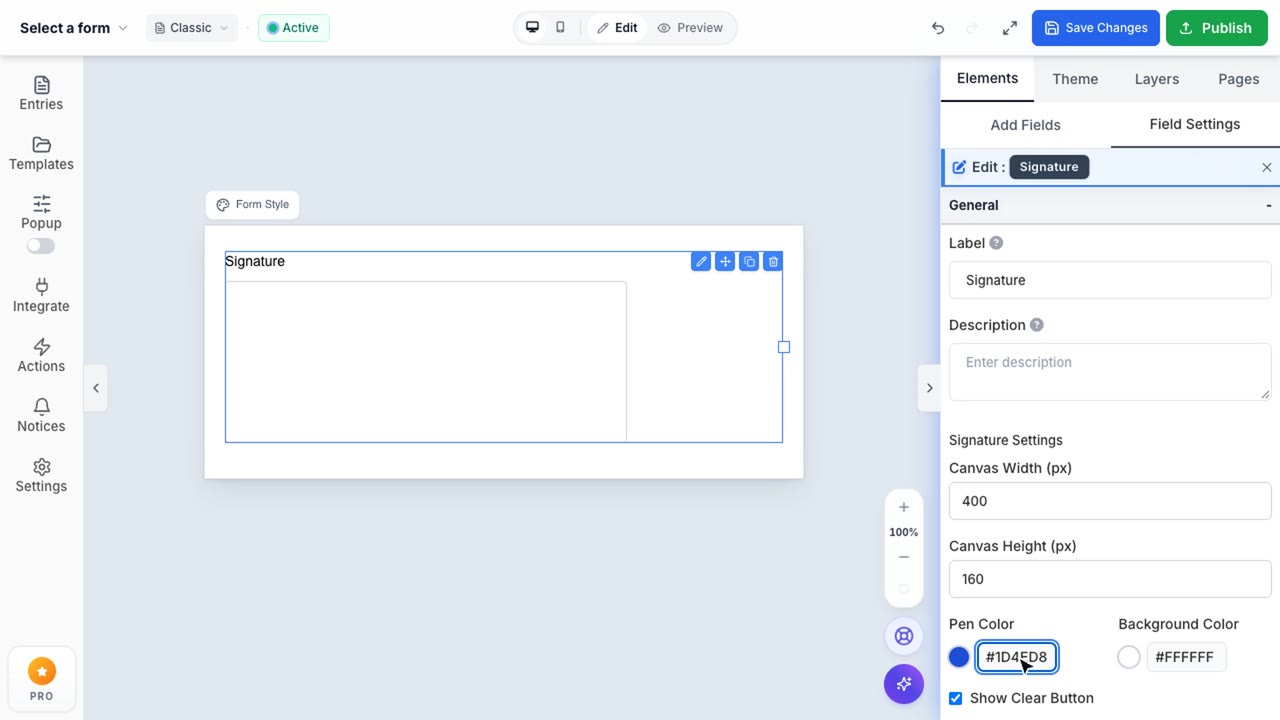
When you drag the Signature field into your form, it renders a signing canvas. By clicking the field, you can access the configuration panel on the right sidebar to adjust its dimensions and appearance.
You can modify several key attributes:
- Canvas Dimensions: Adjust the Width and Height of the signature pad to ensure users have enough space to comfortably sign.
- Pen & Background Colors: Customize the stroke color of the signature (Pen Color) and the background of the canvas to match your form's branding seamlessly.
- Clear Button: Toggle the visibility of the "Clear" button, allowing users to easily erase and redraw their signature if they make a mistake.